

Choose what a staff member can do
Who can do this: Business owners and admins Where to find it: Settings › Team › Add Staff Member ( /business/settings/team ) A few options…
Who can do this: Business owners and admins
Where to find it: Settings › Team › Add Staff Member (/business/settings/team)
A few options decide how a team member works in PandaCue: whether they provide services, can be assigned to product sales, and their Time Clock PIN.
Steps
- In the Add Staff Member panel, tick Is Service Provider if they provide services.
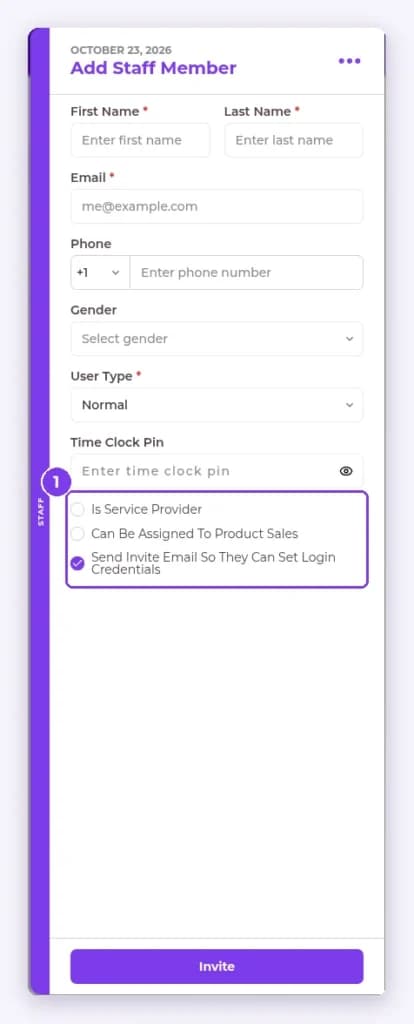
- Tick Can Be Assigned To Product Sales if they sell products.
- Enter a Time Clock Pin so they can clock in and out at the kiosk.
- Select Invite to add them.
Result
The staff member’s options are saved.
Tip: Each staff member uses their Time Clock PIN at the Time Clock kiosk.
Related articles
Still have questions?
Our team is happy to help. Reach out and we'll get you sorted, or keep exploring the Learning Center.