



A solo stylist or one injector can track their own hours in their head. Add five providers, two front desk staff, and a part-time esthetician, and that stops working.
Most clinics end up with three disconnected systems: a booking calendar, a spreadsheet for commission math, and payroll software that needs everything typed in by hand.
Every extra system is another place for a number to get copied wrong.
The real cost shows up on payday. Someone spends an afternoon reconciling tips, service commissions, and product sales by hand.
Mistakes creep in, and staff notice fast when their check is off, even by a few dollars.
How PandaCue Connects Scheduling, Commissions, and Payroll
PandaCue’s staff management tools sit on top of the same calendar used for booking, so a provider’s schedule, their service assignments, and their pay all come from one source instead of three.
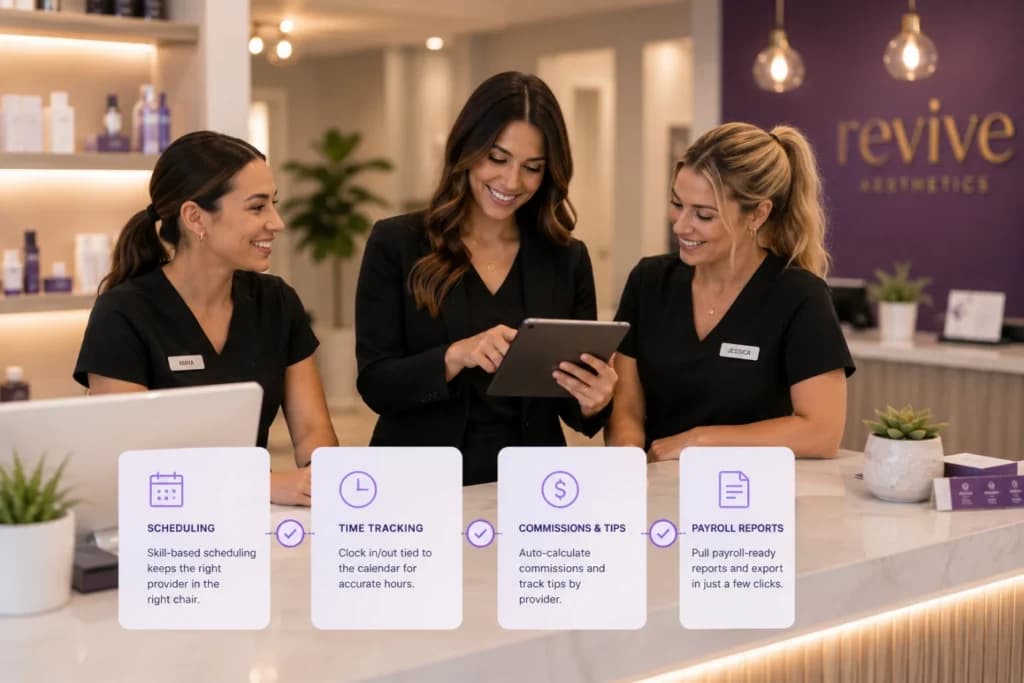
Scheduling by skill and license
You set which services each staff member is qualified to perform, so a client booking a chemical peel or a filler appointment only sees providers who can actually do that service.
This matters even more for med spas, where a service might legally require a specific license or a supervising provider on record.
Time tracking tied to the calendar
Staff clock in and out from the same system that holds their appointments, so you can compare scheduled hours against actual hours without cross-checking two apps.
Commission and tip tracking by provider
When a service or retail sale happens in PandaCue’s point of sale, the commission calculates automatically based on rules you set.
Tips get attributed to the provider who earned them, not split evenly by guesswork.
Payroll-ready reporting
Instead of retyping numbers, you pull a report that shows hours, commissions, and tips by staff member for the pay period, ready to hand off to payroll or export.
Role-based access
Front desk staff, providers, and managers see different things. A receptionist doesn’t need to see another provider’s commission rate, and a provider doesn’t need admin settings.
This keeps sensitive pay data limited to the people who should see it.
Why This Matters More for Multi-Provider and Multi-Location Clinics
A single-owner studio can get by with rough math. A clinic with multiple providers, or multiple locations, can’t.
Commission structures often differ by provider level, by service type, or by location.

A senior injector might earn a different rate than a new hire.
Without a system tracking this automatically, owners either simplify their commission plan more than they’d like, or accept that payroll takes hours every cycle.
Multi-location clinics add another layer. An owner needs to see staffing levels and labor cost across every location, not just one.
PandaCue’s staff management gives that view without pulling separate reports from each site.
Setting Up Staff Management Without the Guesswork
Getting this right from the start saves you from fixing commission errors after the fact.
Start with staff profiles.
Add each team member, their role, and which services they’re licensed or trained to perform. This step is what makes skill-based booking work correctly later.

Set commission rules next.
Decide if commission is a flat percentage, tiered by revenue, or different for services versus retail. Enter these rules once so the math runs itself going forward.
Connect time tracking to your actual schedule.
Make sure staff are clocking in through the same system holding their appointments, not a separate app, or you’ll end up with two versions of the truth.
Review your first payroll report before you rely on it.
Check one or two providers by hand against the report to confirm the commission math matches what you expect, then trust it going forward.
An Example of What This Looks Like Day to Day
Picture a spa with four estheticians and two front desk staff.
Before switching to a connected system, the owner spent every other Friday afternoon adding up tips from receipts and commission from a separate spreadsheet.

After moving scheduling, time tracking, and commission rules into one system, that Friday afternoon task became a five-minute report pull.
The owner also noticed something the spreadsheet never showed clearly: one esthetician’s actual hours were consistently running higher than her scheduled shift, which led to a conversation about staffing that fixed a real overtime issue.
This is an illustrative example built to show how the features work together, not a documented case study.
FAQs
Does staff management work for both service providers and front desk staff?
Yes. You can set different roles and permission levels for providers, front desk staff, and managers, so each person sees only what’s relevant to their job.
Can I set different commission rates for different services?
Yes. Commission rules can be set by service type, provider level, or a flat rate, depending on how your clinic structures pay.
Does this replace my payroll software?
No. It tracks hours, commissions, and tips, then gives you a report to send to your payroll provider or accountant.
Is staff management useful for a single-location salon, or only larger clinics?
It helps at any size, but the time savings grow with your team. A solo owner mostly benefits from having clean records; a multi-provider team benefits from automated commission math and fewer payday disputes.
Can front desk staff see other providers’ pay information?
No, not by default. Role-based access keeps commission and pay details visible only to the provider themselves and to managers or owners.
How does this connect to scheduling and booking?
Staff profiles set which services each person can perform, and that same information controls what clients see when booking online. One update to a staff profile updates both.
Bringing It Together
Staff scheduling and payroll don’t need three separate tools fighting each other for accuracy.
When your calendar, time tracking, and commission rules pull from the same data, payday stops being a research project.
PandaCue’s staff management tools connect to scheduling, payments and point of sale, and reporting.
So staffing decisions are based on real numbers instead of a spreadsheet someone assembled the night before.