

Custom fees and checkout settings
Who can do this: Business owners and admins Where to find it: Settings › Custom Fees and Settings › Advanced Settings (…
Who can do this: Business owners and admins
Where to find it: Settings › Custom Fees and Settings › Advanced Settings (/business/settings/custom-fees)
Add custom fees for staff sales and set up checkout options.
Steps
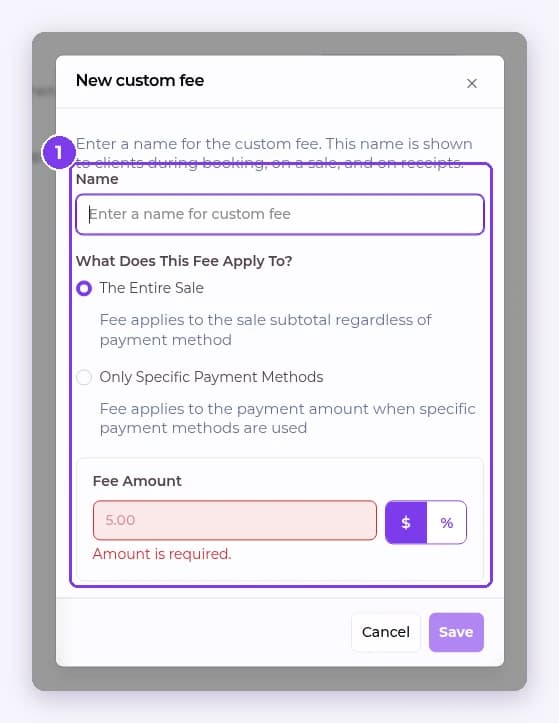
- Go to Settings › Custom Fees and select New Custom Fee. Enter a Name, choose What Does This Fee Apply To? (The Entire Sale or Only Specific Payment Methods), set the Fee Amount in $ or %, then select Save.
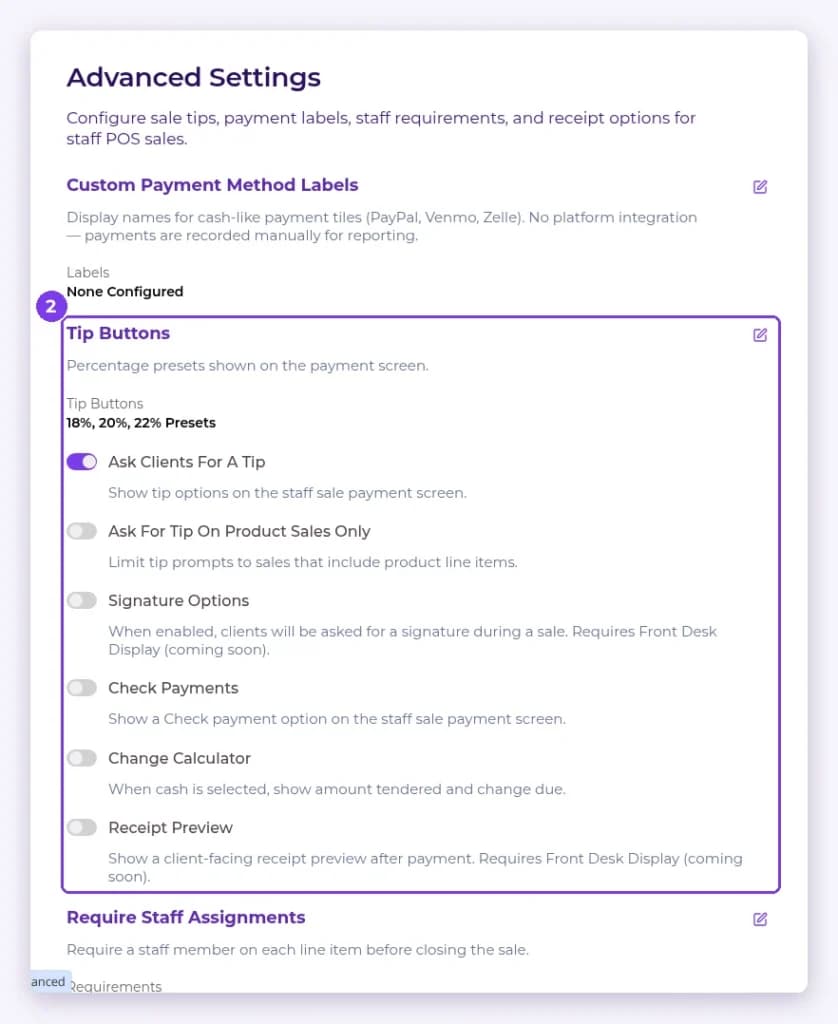
- Open Advanced Settings to set Custom Payment Method Labels, Tip Buttons, Ask Clients For A Tip, Signature Options, Check Payments, Change Calculator, Receipt Preview and Require Staff Assignments.
Result
Checkout uses your fees and options.
Related articles
Still have questions?
Our team is happy to help. Reach out and we'll get you sorted, or keep exploring the Learning Center.