

Import your clients
Who can do this: Business owners and admins Where to find it: Settings › Data import & export ( /business/settings/data ) Bring your client…
Who can do this: Business owners and admins
Where to find it: Settings › Data import & export (/business/settings/data)
Bring your client list into PandaCue in one go instead of adding contacts one by one.
Before you start
- Export your client list from your previous system as a file.
- Check that names, emails and phone numbers are in separate columns.
Steps
- Go to Settings › Data import & export. You will see a list of Entities.
- On the CONTACT row, select Import.
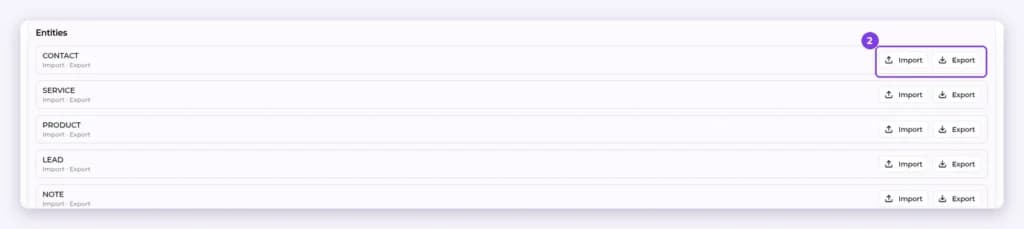
- Upload your file and follow the on-screen steps.
- Scroll to Recent imports at the bottom of the page to see the status of each import, for example COMPLETED.

Result
Your clients appear in Contacts.
Tip: Import a small test file first to check the result.
Warning: Only import client data you have permission to use.
FAQ
Can I import from the Contacts page?
Yes. In Contacts, open the filter icon and select Import Contacts.
Related articles
Still have questions?
Our team is happy to help. Reach out and we'll get you sorted, or keep exploring the Learning Center.