

Find your way around PandaCue
Who can do this: Everyone on your team Where to find it: Dashboard and the Apps launcher ( /business/dashboard ) Your Dashboard shows the…
Who can do this: Everyone on your team
Where to find it: Dashboard and the Apps launcher (/business/dashboard)
Your Dashboard shows the day at a glance. The Apps launcher and its search take you to every module and setting.
Steps
- Open the Dashboard to see Today’s Appointments, New Leads, Appointments to Confirm, Follow-ups and Today’s Schedule.
- Select the grid icon in the top bar to open Apps. Apps are grouped into Core Apps, Marketing and Automation and Setup and Management.
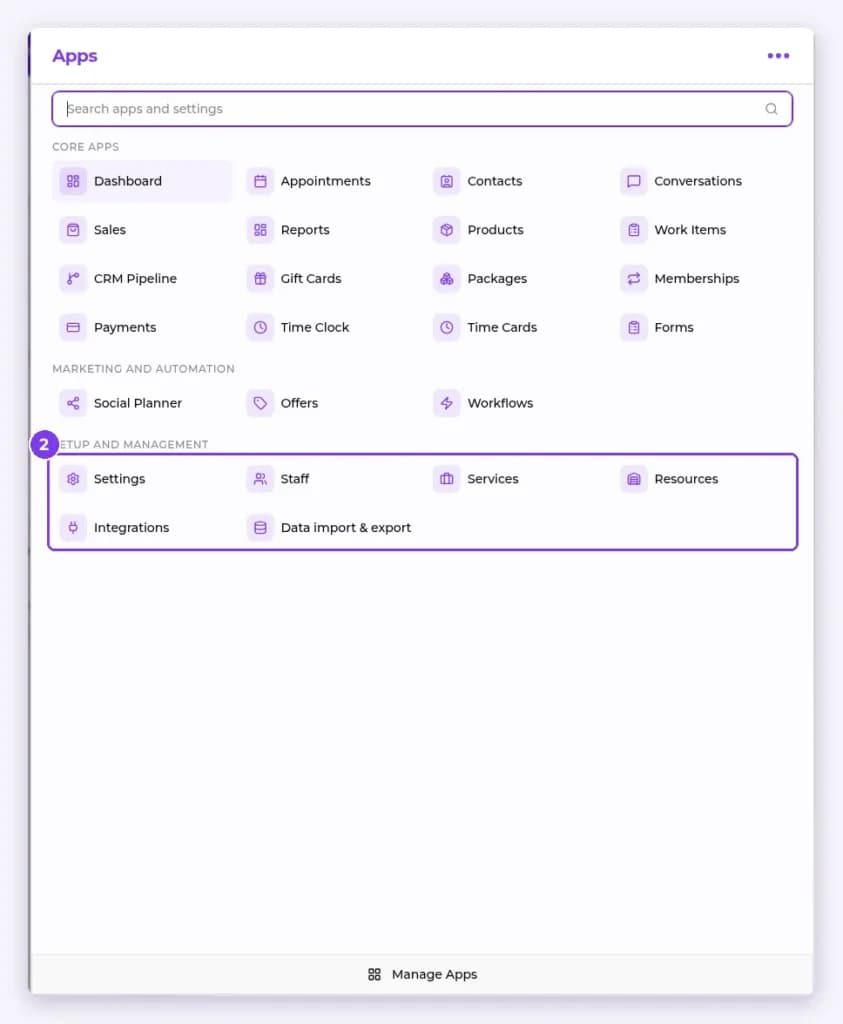
- Use Search apps and settings to jump straight to what you need.
- Select Manage Apps at the bottom of the panel to manage your apps.
Result
You can move between modules and find any setting quickly.
Tip: Turn on Dark Mode in Settings › Appearance if you prefer a darker screen.
Related articles
Still have questions?
Our team is happy to help. Reach out and we'll get you sorted, or keep exploring the Learning Center.