

Set your business hours and locations
Who can do this: Business owners and admins Where to find it: Settings › Business Setup › Locations and Business Hours (…
Who can do this: Business owners and admins
Where to find it: Settings › Business Setup › Locations and Business Hours (/business/settings/profile?tab=address)
Your location and weekly business hours tell PandaCue where you work and when. Hours outside your working time are shaded on the calendar.
Before you start
- Have your business address and weekly opening hours ready.
Steps
- Go to Settings and open Locations. It holds your business address.
- Select the edit (pencil) icon and enter Address Line 1, Address Line 2, City, State / Province, Country and Zip / Postal Code.
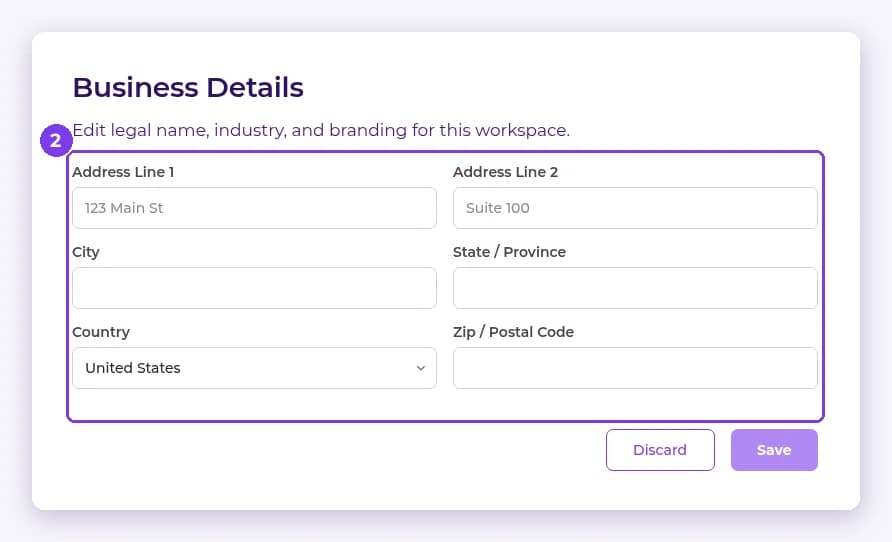
- Select Save.
- Open Business Hours. Each day of the week shows its hours, or Closed. Use the arrows to move between weeks.
- Select the edit (pencil) icon next to a day to change its opening and closing times, then save.
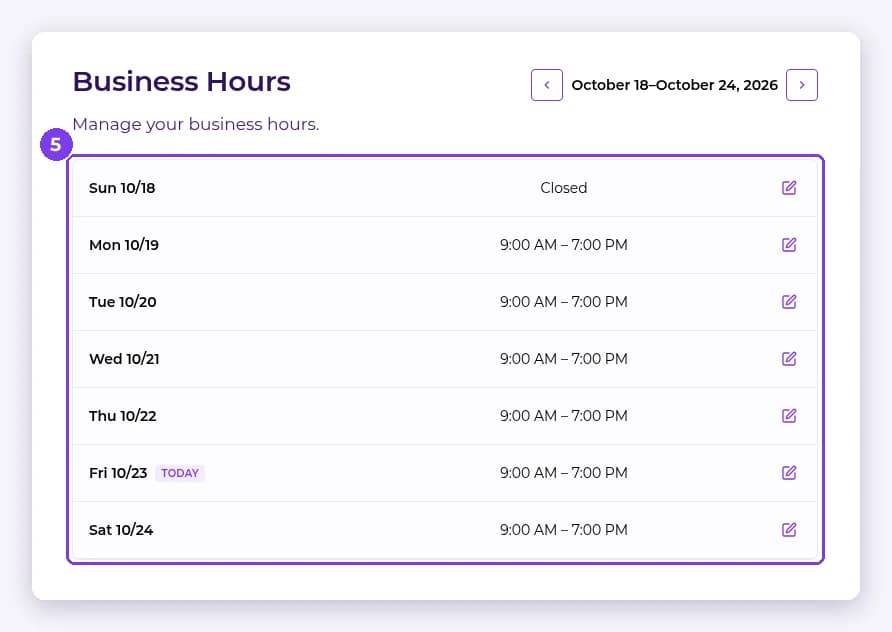
Result
Your address is saved and your weekly hours are shown in Business Hours. The calendar shades time outside working hours.
Tip: To mark a staff member as away for specific dates, use Quick Tools rather than changing your business hours.
FAQ
Do business hours control online booking?
Online booking has its own preferences, such as the booking window and minimum notice. See the online booking article.
Related articles
Still have questions?
Our team is happy to help. Reach out and we'll get you sorted, or keep exploring the Learning Center.